Skip to content

Finished product

The reader that closes the attendance-sheet question

One product in two forms. The reader alone is enough to start - you add the cloud when on-site access stops being enough.

RAZ-RCP-1

The unit by the door

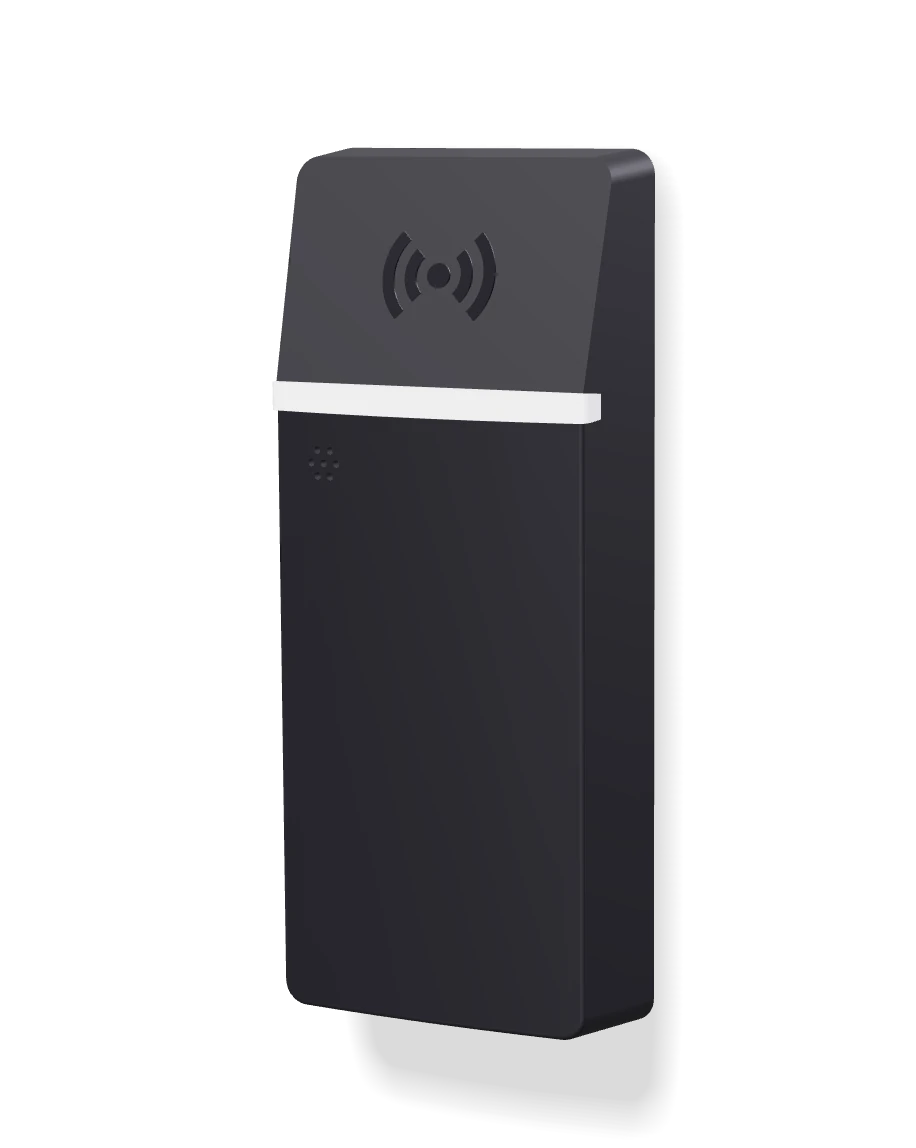
A contactless reader in a housing built for offices and production halls. It runs on its own, with no permanent link and no computer beside it.

  • Contactless card or fob
  • Works offline, with event memory
  • Wall-mounted in a day
  • Power supply included, indoor use

RCP-CLOUD

Online access

The same software as on the device, only faster and open in a browser. Check attendance from home, from a second site or from your phone.

  • Reports and export in the browser
  • Reachable from anywhere
  • Data on servers in Europe
  • Updates without your involvement

See it in action

Tap the card, the strip lights up. Done.

This is the real RAZ-RCP-1, straight from the enclosure design. Pick a person and see what happens at the entrance - just like at work, every day.

RAZ-RCP-1 on a wall: black enclosure, reader symbol and a milky light strip

Who's tapping?

Attendance log - today

  1. Nobody has tapped in yet. Pick a person above.
  • Green and three rising tones - clock-in recorded
  • Blue and three falling tones - clock-out recorded
  • Red and two low tones - card rejected

Before and after

No more sign-in sheet at the door

Same company, same people. The only thing that changes is how the hours get recorded.

Before

Paper sign-in sheet

  • A morning queue at the notebookEveryone hunts for a pen and signs the sheet. Anyone in a hurry fills it in later - from memory.
  • Arrived 8:07, wrote 8:00A few minutes a day per person. Nobody checks, and over a month it adds up to hours.
  • Popping out for a smokeSmoke and coffee breaks never make it onto the sheet. Nobody knows how long they took or how many there were.
  • Retyping at month endHR copies the sheets into Excel and guesses what people wrote. Corrections drag on until payday.

After

RAZ-RCP-1 at the door

  • One second at the doorAn employee taps their card, the strip turns green and they get to work. No notebook, no pen.
  • To the minuteArrived at 8:07 - the log says 8:07. Nothing to round.
  • Breaks are visibleStepping out is one tap, coming back is another. The report shows how long each break took.
  • The report adds itself upAt month end you download the hours as XLSX or PDF. Nobody retypes anything.

Calculator

How soon does the reader pay for itself?

Set the sliders to match your company. We only count the time that quietly slips away with a paper sheet - nothing more.

10 people

People who sign the attendance sheet today

PLN 40/h

What one person's working hour costs you

5 min

Minutes per person per day. Arrived 8:07, wrote 8:00.

5 min

Minutes per person per day. A smoke, a coffee, stepping out for a moment.

4 h

HR hours per month spent copying sheets and fixing them.

RAZ-RCP-1 pays for itself in

12working days

Lost every month
PLN 1,560
Over a year
PLN 18,720
  • Rounding on the sheetPLN 700/mo
  • Unrecorded breaksPLN 700/mo
  • Retyping the sheetsPLN 160/mo

RAZ-RCP-1 price: PLN 799 net, paid once.

Day-by-day simulation

  • Paper sheet, cumulative
  • RAZ-RCP-1, one-off
Show as a table
PeriodPaper sheetRAZ-RCP-1
1 monthPLN 1,560PLN 799
2 monthsPLN 3,120PLN 799
3 monthsPLN 4,680PLN 799
6 monthsPLN 9,360PLN 799
12 monthsPLN 18,720PLN 799

This is a simulation based on your assumptions, not a promise. We count 21 working days a month. Staff time slips away daily; retyping the sheets costs you at the end of each month. Net price, excluding the optional RCP-CLOUD subscription.

Capabilities

Everything RAZ-RCP-1 can do

A reader by the door and a panel in the browser. No software to install and no server on site.

  • Dashboard and reports

    • Who is at work right now, and since when
    • Attendance and working time for any period, for everyone or one person
    • Export to Excel (XLSX), print or save as PDF
    • Hour totals, with weekends highlighted
    • Hints on what to check: a missing clock-out or a suspiciously long shift
  • Employees and corrections

    • Read a card's number by tapping it on the reader
    • Several cards or fobs per person
    • Assign an unknown card straight from the dashboard or a report
    • Correct times and add missing taps
    • A shift past midnight counts as one shift
  • The reader at the door

    • 13.56 MHz cards and fobs: MIFARE and ISO/IEC 14443-A compatible
    • Tells clock-in from clock-out by itself, no buttons
    • A different colour and sound for in, out and rejected
    • Tapping the same card again moments later does not double the record
    • Rejects phones and watches that present a random number
    • Reports in the panel when the reader stops working
  • Doors and access control

    • Relay output for an electric strike or a magnetic lock
    • Pulse or reverse mode, pulse from 0.1 to 10 s
    • Lets in any card or only cards on the employee list
    • Can open the door on clock-in only
    • Test the relay straight from the panel
  • Network and integrations

    • Ethernet cable, company WiFi or the device's own hotspot
    • Works without internet, storing taps in its own memory
    • Battery-backed clock with automatic daylight saving
    • Automatic sending of taps to your payroll system
    • A local network name instead of an IP address
  • Panel and administration

    • Panel in the browser, on a phone too, with nothing to install
    • An administrator account and an office account with narrower rights
    • Panel in Polish, English and German
    • Updates over the internet or from a file, with no data loss
    • Data backup in one click
    • A forgotten password is recovered with a reset card or button; data stays

From the box to the first report

  1. 01

    Mounting

    Fix the reader by the entrance and plug in the power supply. No network rebuild, no server to set up.

  2. 02

    Cards

    Assign cards to your staff. A new person takes a minute; a lost card is blocked immediately.

  3. 03

    Everyday use

    People tap in and tap out. Nothing else about the day changes.

  4. 04

    Month end

    Download the summary of hours and absences. Payroll gets a file instead of a pile of paper.

For the curious

Full specifications and technical documentation live in the integrator portal.

Integrator portal

Technical data

Identification
Contactless card or fob
Offline operation
Yes, with event memory
Power
Power supply included
Mounting
Wall-mounted, indoor use
Environment
Offices and production halls
Manufacturing
Poland

Standards compliance

Marking
CE - Radio Equipment Directive (RED) 2014/53/EU
Safety
EN IEC 62368-1 · EN 50663
Electromagnetic compatibility
ETSI EN 301 489-1, -3 and -17 · EN 55032 · EN 50130-4
Radio spectrum
ETSI EN 300 328 (WiFi 2.4 GHz) · ETSI EN 300 330 (13.56 MHz card reader)
Cybersecurity
EN 18031-1
Substances and recycling
RoHS (EN IEC 63000) · REACH · WEEE · Battery Regulation (EU) 2023/1542

Cybersecurity

A reader on the wall, secured like a company laptop

EN 18031-1 is the standard used in the EU since 1 August 2025 to assess the cybersecurity of internet-connected radio equipment. RAZ-RCP-1 complies with it.

EN 18031-1 compliant

  • Encrypted connection (SSL/TLS)

    On the company network the panel answers over HTTPS only. The certificate key is created inside the device and never leaves it.

  • Two-factor sign-in (MFA)

    The administrator password can be backed by a code from a phone app. Turning this off takes a current code, so a hijacked session cannot remove it.

  • Encrypted storage

    Passwords, keys and settings sit in memory encrypted with a key unique to each unit. A chip desoldered from the board will not give them away.

  • Secure boot

    The device only runs firmware signed by us. Swapped or modified firmware simply will not start.

More safeguards

  • Unique passwords for every unit, no shared factory password
  • Lockout after five failed sign-ins, weak passwords rejected
  • The device never sends passwords back to the browser
  • Panel access from the company network off by default
  • WPA2/WPA3 hotspot, never an open network
  • Certificate without browser warnings, or from your company's own CA
  • Separate office account with no access to device settings
  • Updates downloaded over HTTPS only, with server verification
  • A failed update rolls back to the previous version on its own

Not sure which one you need?

Tell us how many people you employ and whether you need access from off site. We will say plainly which fits.

Ask us which to pick